 WHITECORE
Venue maps (optional)
Upload a floor plan to place cameras on a map, and use four-point matching to project activity onto it. Basic zones, counting, dwell and content automation don't need it.
Resources / Vision AI
Vision AI
Connect a USB camera or your existing CCTV, draw the areas you care about, and WhiteCore measures them. Video is processed locally; only anonymous metadata goes to the cloud.
Diagram: zones drawn on a camera view. Each colour is a different measurement.
What it measures
Your normal screen content keeps playing. Measurements feed the Dashboard, Analytics and reports.
People passing through a drawn doorway or gate.
How many people are present in a zone right now.
How long people stay in a customer area.
People waiting and their average wait.
Separate active from fleeting visitors by dwell.
Where activity concentrates, by camera or floor plan.
Optional audience estimates. Compatible cameras can give aggregate estimates (for example adult or child) across the full camera view. They are estimates, not identities, and you are responsible for notices and consent.
How it works in the app
Bring your WhiteCore Player online, then add a USB or RTSP camera and confirm it shows a fresh frame. Camera setup
In Vision AI › Zones, click around an entrance, queue, counter or customer area. Leave out roads, reflections and staff-only spots.
Collect data only, or use the area to change what selected screens play. Guided Setup asks only for what that outcome needs.
Live view, heatmaps, Analytics and AI executive recommendations.
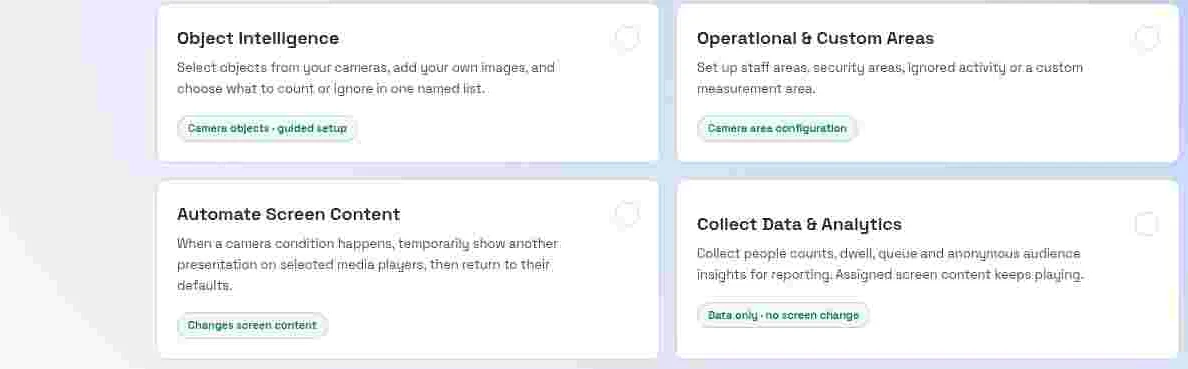
Guided Setup: Object Intelligence, Operational & Custom Areas, Automate Screen Content, or Collect Data & Analytics.
Upload a floor plan to place cameras on a map, and use four-point matching to project activity onto it. Basic zones, counting, dwell and content automation don't need it.
WhiteCore processes compatible camera video locally and sends anonymous metadata to the cloud. It does not use facial recognition, visitor identification, phone scanning, Wi-Fi probing or device fingerprinting.
Privacy & securityWant alerts or screen changes? Object Intelligence, SMS alerts and content triggers live in Measurements & Triggers. Measurements & Triggers
Vision AI is included with the AI camera add-on, US$10 per camera/month. Camera-driven content playback also needs a media player licence (US$9/player/month).
Sign up free. No card needed. Add a player when you are ready to go live.